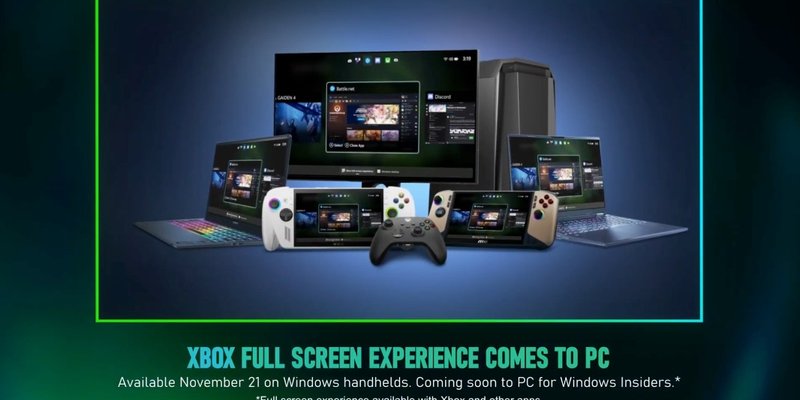
Xbox Mode finally sounds like Microsoft is solving the right Windows gaming problem: handheld PCs feel too much like tiny laptops. That is not charming. That is a setup wizard with thumbsticks.
The current Xbox Mode pitch, backed by Microsoft's own support page and recent Xbox Wire posts, is simple enough. It gives Windows 11 players a full-screen, controller-optimized gaming space, uses a chosen gaming home app as the launcher, and can boot straight into that experience on handheld devices. It also changes app behavior, trims startup noise on handhelds, and gives players controller-friendly ways to move between games and apps.
That is exactly the sort of thing a ROG Ally, Legion Go, or other Windows handheld needs. It is also exactly the sort of thing that should not be shoved in front of someone sitting at a desktop PC with three monitors, a keyboard, a mouse, Discord, mods, capture tools, and seventeen windows open because PC gaming is apparently a lifestyle disease.
Why handheld players want this
Windows handhelds have always had a weird identity problem. The hardware says console. The operating system says quarterly expense report. You can play full PC games on the couch, sure, but sooner or later you hit a desktop prompt, a launcher tantrum, a window that refuses to scale, or a tiny checkbox designed by someone who has never held the device they are targeting.
Xbox Mode attacks the friction directly. Microsoft's support documentation says handheld users can choose a supported home app, add entry points through Game Bar and Task View, and optionally enter Xbox Mode on startup. When that startup option is enabled, Windows limits background processes to help gaming performance and battery life. That matters on a handheld, where five extra minutes of battery can be the difference between finishing a boss fight and staring at a dead slab of plastic on the train.
The one-window-at-a-time behavior also makes more sense here than it does on a normal PC. On a seven-inch or eight-inch screen, window management is not freedom. It is punishment. Full-screen games, controller navigation, quick task switching, and fewer background chores are the right trade.
Why desktop players should skip it
Desktop PC gaming is messy because players make it messy on purpose. People run launchers, chat apps, browser tabs, performance overlays, mod managers, streaming tools, guides, spreadsheets, and occasionally the actual game. A console-style shell can be useful as an option, especially for couch PCs, but it becomes annoying the second it treats a desktop rig like an oversized handheld.
Microsoft says Xbox Mode is rolling out in select markets on Windows 11 PCs and that players can switch back to the Windows desktop. Good. Keep that line bright. Desktop players should be able to ignore it completely unless they ask for it, because the value of PC gaming is not only that it runs games. It is that players can bend the machine around the way they play.
There is also the storefront problem. Xbox Mode can surface an aggregated library, including Game Pass and installed games from other PC storefronts. That sounds useful, but only if it respects the ugly reality of PC libraries. Steam, Epic, Battle.net, GOG, itch.io, emulators, standalone launchers, mods, fan patches, weird old executables sitting in a folder named DO_NOT_DELETE. If Xbox Mode turns into another front door that only likes the tidy parts of the house, players will walk around it.
What Microsoft still needs to fix
The big test is not whether Xbox Mode looks clean in screenshots. The test is whether it behaves when real players bring real libraries to it.
Microsoft needs boring reliability: clean suspend and resume, readable text, dependable controller focus, quick exits to desktop, obvious settings, and no launcher loops where a game opens another app that opens another prompt that needs a cursor. It also needs clear compatibility signals. If a game is a pain on handheld, players should know before they waste a commute troubleshooting it.
Third-party stores matter too. If Xbox Mode wants to be the handheld layer for Windows, it cannot act like Steam, Epic, Battle.net, and the rest are tolerated guests. The mode only works if it treats the player's actual library as the library.
The sensible version
The best version of Xbox Mode is boring in a good way. Handheld users boot into it, launch games, switch apps with a controller, and forget Windows is underneath until they need it. Desktop users see it as an optional couch-gaming button, not a new personality forced onto their PC.
That balance is the whole story. On handhelds, Xbox Mode could make Windows feel less like a compromise. On desktops, restraint is the feature. Give players the console-like layer when it helps, then get out of the way when the mouse and keyboard crowd wants its glorious chaos back.
Sources: XDA's Xbox Mode report, Microsoft Support's Xbox Mode documentation, Xbox Wire's Windows 11 PC rollout post, and Xbox Wire's Full Screen Experience preview note.