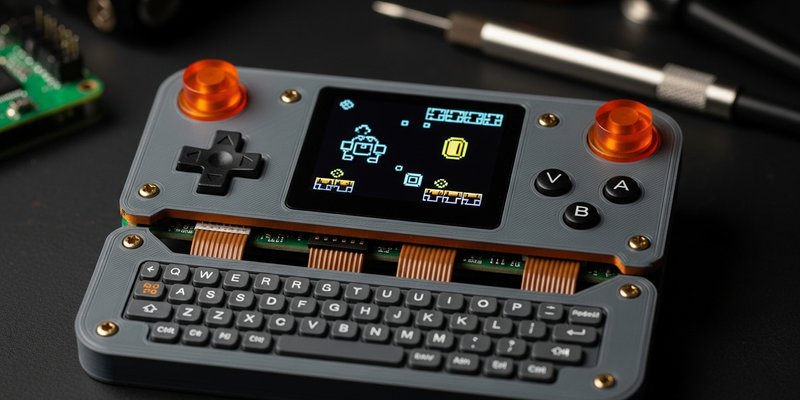
There is a very specific kind of joy in holding a gaming device that should not exist.
Not a product. Not a launch-window SKU with a marketing deck, warranty language, and a carefully focus-tested shade of “midnight graphite.” I mean a handheld that smells faintly of solder and ambition. A pocket machine with a 3D-printed shell, a custom PCB, a battery wedged into the only cavity that made sense, and a Linux stack held together by documentation, stubbornness, and one forum post from 2019 that somehow still saves the day.
That is why Hackaday’s latest Raspberry Pi handheld rabbit hole matters. The project in question, PiBrick by Ahmad Amarullah, is built around a Raspberry Pi Compute Module 5, a 3.92-inch OLED touch display, a BlackBerry-style keyboard, a custom carrier board, a 5000 mAh battery, and a 3D-printed enclosure. Hackaday called it robust and versatile, which is basically the nicest thing you can say about a cyberdeck without immediately being asked to show your KiCad files.
But PiBrick is bigger than one neat build. It is a reminder that retro gaming’s most interesting future is not locked behind another boutique handheld, another sealed plastic slab, or another storefront where your childhood is sold back to you as a subscription perk. The real endgame is messier, nerdier, and much more durable: build the machine yourself, then play on your own terms.
The Difference Between Owning a Device and Understanding It
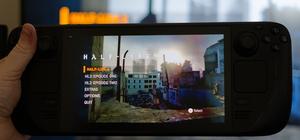
Modern handheld gaming hardware is great. The Steam Deck exists, Linux won, and somewhere a Windows handheld is currently trying to update a graphics driver while pretending that is a console experience. Beautiful chaos. But even the best commercial handhelds are still finished products. They arrive as answers.
A Raspberry Pi handheld arrives as a question: what are you willing to learn?
That question is the whole magic trick. When you build a Pi-based handheld, even from an existing design, the console stops being a sealed oracle. You start seeing the machine as layers: display interface, input matrix, power management, thermal budget, storage, audio, operating system, emulator frontend, controller mappings, sleep behavior, charging safety, and the inevitable “why did Bluetooth vanish after reboot” gremlin. Pigeon chirped at that one. It knows pain.
This is not romantic inconvenience for its own sake. It changes the relationship. A commercial device encourages consumption. A DIY handheld encourages literacy. You learn why display latency matters, why a clean D-pad trace layout can make a platformer feel better, why battery chemistry deserves respect, and why the phrase “just add USB-C charging” has personally ruined several weekends across the maker community.
Why Compute Modules Make Handhelds Feel Serious
The old-school Raspberry Pi handheld scene often revolved around full-size Pi boards or Pi Zero builds hacked into shells never designed for them. That gave us some wonderful Game Boy conversions, but it also forced compromises: awkward connector placement, thick bodies, battery gymnastics, and cable routing that looked like a tiny server room lost a knife fight.
The Compute Module family changes that. Raspberry Pi’s CM5 is essentially a compact embedded system-on-module with the Pi 5 generation’s core strengths: a 2.4GHz quad-core Arm Cortex-A76 processor, configurable RAM and eMMC, PCIe, USB, display interfaces, GPIO, and the software ecosystem that keeps Raspberry Pi projects from turning into cursed archaeology.
For handheld builders, the module approach is the difference between “how do I cram this board into a case?” and “how do I design the case and carrier board around the experience I want?” That is the grown-up version of the hobby. You can place controls properly. You can route display, audio, buttons, charging, storage, and expansion with intention. You can make something that feels less like a Franken-console and more like a small-batch instrument.
PiBrick leans into that philosophy. The custom PCB is not decoration; it is the spine. The 3D-printed shell is not just a cosplay enclosure; it is the chassis that makes the battery, screen, keyboard, and module coexist. This is what separates a cute build from a serious handheld computer.
Retro Gaming Is the Perfect Workload for Weird Little Linux Machines
Retro games thrive on constraints. That makes them a perfect match for DIY hardware because the target is clear: low latency, good controls, stable frame pacing, usable audio, sane battery life, and a screen that does not turn pixel art into soup.
You do not need a corporate miracle chip to enjoy 8-bit, 16-bit, arcade, early 3D, or handheld classics. You need a machine whose compromises are honest. A CM5-based device has enough headroom to make many retro workloads comfortable while still letting the builder obsess over the parts that actually matter. The screen. The D-pad. The thermal path. The input driver. The frontend. The suspend behavior. The terrible little scrape sound a shoulder button makes if your print tolerances are off by half a millimeter.
That is where the DIY scene becomes more than nostalgia delivery. It becomes preservation through participation. You are not just launching a ROM from a menu. You are building the tiny museum, wiring the lights, and fixing the door hinge when it squeaks.
The Open Stack Is the Point
The best Pi handhelds are not compelling because they beat every commercial device on price or polish. They usually do not. If your only goal is to buy a perfect turnkey handheld, the market has options. Some of them are excellent. Some of them are Android rectangles wearing fake nostalgia mustaches, but that is between them and their firmware update policy.
The DIY advantage is control.
- Repairability: if a button fails, you can open the shell and fix the button instead of conducting a warranty séance.
- Software freedom: you can run a Linux distribution, RetroPie-style frontend, EmulationStation setup, custom scripts, SSH tools, or whatever unholy launcher experiment you compiled at 2 a.m.
- Hardware iteration: if the first shell is too thick, print another. If the battery door rattles, revise it. If the keyboard is strange, map it better.
- Longevity: the Raspberry Pi ecosystem has documentation, community examples, and parts availability that make projects easier to revive years later.
Jeff Geerling’s CM5 testing underlines the classic Raspberry Pi advantage: raw performance is not the only metric. There are faster modules and stranger boards, but support matters. A handheld that cannot get a stable OS image, reliable GPU acceleration, or sane input handling is not a gaming device. It is a drawer artifact with charging anxiety.
Battery Life Is Where the Romance Meets Physics
Now for the annoying kernel log entry: CM5 power is not magic. Geerling found major performance gains over CM4, but also noted that full-load power can nearly double. In a battery-powered handheld, that matters. More speed means more heat and more drain. The laws of thermodynamics remain undefeated, smug little goblins that they are.
This is why handheld design is not just “put fast board in shell.” It is power budgeting. It is deciding whether your screen is too hungry, whether the CPU should be capped for retro workloads, whether active cooling is worth the noise, whether eMMC is preferable to removable storage, and whether your charging circuit is appropriate for a 5000 mAh pack inside a printed enclosure that may live in someone’s backpack.
The best DIY handhelds take these constraints seriously. That is what makes a project like PiBrick interesting: it looks like someone thought about the whole device, not just the headline component. Robustness is not an aesthetic. It is what happens when power, structure, controls, software, and serviceability all survive contact with human hands.
Why This Scene Is Healthier Than Another Locked Ecosystem
Retro gaming keeps getting repackaged as a product category: mini consoles, subscription libraries, anniversary collections, licensed handhelds, cloud catalogs, and deluxe boxes full of games you already bought three times. Some of that is good. Legal access matters. Preservation matters. Developers deserve to be paid. Put the pitchfork down; we are not speedrunning a bad-faith discourse dungeon today.
But commercial nostalgia often turns play into permission. The DIY handheld scene moves in the opposite direction. It says: learn the stack, build the tool, respect the games, and keep the hardware understandable. That is not piracy rhetoric. That is ownership literacy.
A home-built Linux handheld does not need to be the cheapest, fastest, or prettiest device in the room. It only needs to be yours in a way sealed devices rarely are. Yours to repair. Yours to reflash. Yours to improve. Yours to ruin with an experimental kernel and then rescue from a serial console like a tiny wounded server. Beautiful.
The Verdict
PiBrick is not important because every player should build one. Most people will not, and that is fine. Soldering is not a moral virtue. Neither is knowing what DPI display output means before breakfast.
It is important because projects like this keep gaming hardware culturally alive. They turn retro play from passive nostalgia into active craft. They remind us that a console can be an object of study, not just a storefront with buttons. They give players a path out of locked-down ecosystems without demanding that every device become a minimalist beige Linux sermon.
The Raspberry Pi handheld scene is retro gaming’s true savior not because it replaces commercial hardware, but because it preserves the hacker impulse underneath the hobby: curiosity, repair, iteration, and control.
Build it, flash it, break it, patch it, play it. That is the loop. And honestly? That is a better endgame than waiting for another corporation to decide which memories are compatible this quarter.